Download for Mac

Scrannotate for Mac

Get Scrannotate from the Mac App Store. Native on Apple Silicon and Intel, with capture and annotation in one focused app.

Listing link coming soonMac App Store

Have a question before buying? Email support.

$14.99 onceFree updatesNo Scrannotate account

System requirements

Operating systemmacOS 11 (Big Sur) or later, Apple Silicon and Intel
InternetOnly to download from the store. The app works offline.

Install and first capture

  1. Open the Mac App Store listingClick the button above, then Get or the $14.99 price button. Sign in with your Apple ID if asked.
  2. Open ScrannotateFind it in Launchpad or your Applications folder.
  3. Allow screen recordingmacOS asks every screenshot app for permission to see your screen. Open System Settings, go to Privacy and Security, then Screen Recording, and turn Scrannotate on. You only do this once.
  4. Set your hotkeyPick the shortcut you want to use for a new capture. See the app’s available capture shortcut options.
  5. Take your first capturePress the hotkey, drag over anything on screen, add an arrow with A, then use the editor’s Copy action to copy it.
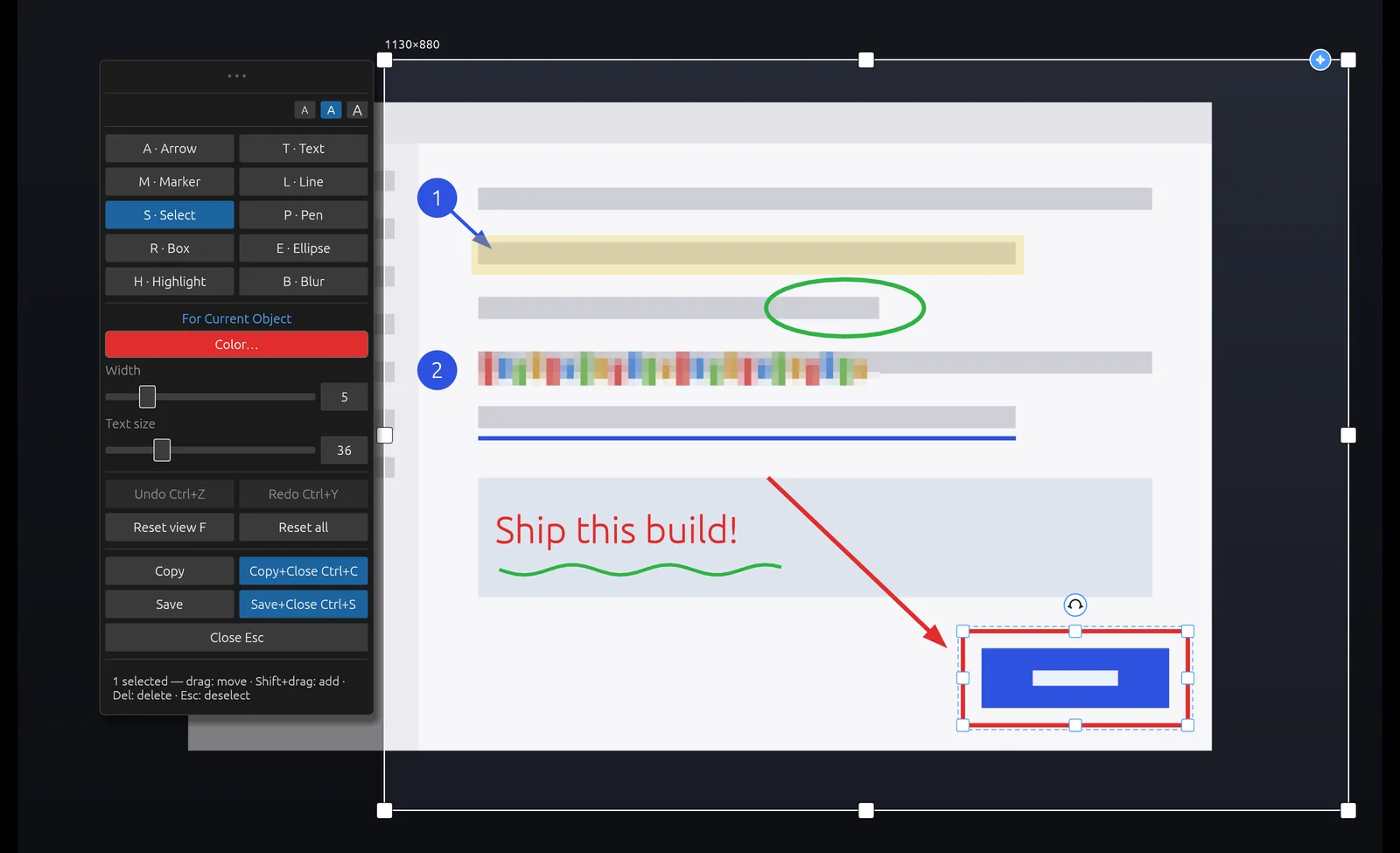
The Scrannotate editor with a capture marked up using arrows, boxes, a highlight, blur and text.
Scrannotate editor shown on Mac; appearance may vary by platform.

Shortcuts to learn first

A arrow, R box, T text, B blur, H highlight, M numbered marker. Use the editor’s Copy, Save and Undo actions. Follow the shortcut labels shown in your version of the app.

Need it for Windows?

FAQ

Scrannotate on Mac

Does Scrannotate run on Apple Silicon?

Yes. It runs natively on Apple Silicon (M-series) Macs and on Intel Macs.

Why does macOS ask for Screen Recording permission?

macOS requires it for any app that captures what is on your screen. Scrannotate uses it only to take the screenshots you ask for. Nothing is uploaded.

Which macOS versions are supported?

macOS 11 (Big Sur) and later.

Can I use it on more than one Mac?

Apps bought on the Mac App Store can be installed on the Macs signed in with your Apple ID, under Apple's usual terms.

Stop waiting on your screenshot tool.

$14.99 once. Free updates. Mac and Windows.